2. Installation
There is no specific installation process, you can install it like any other Blender addon/extension.

You can drag and drop the addon Zip file named addon_easy_builder_x.x.x.zip (where x.x.x is the latest version of the addon) in blender and click on OK.
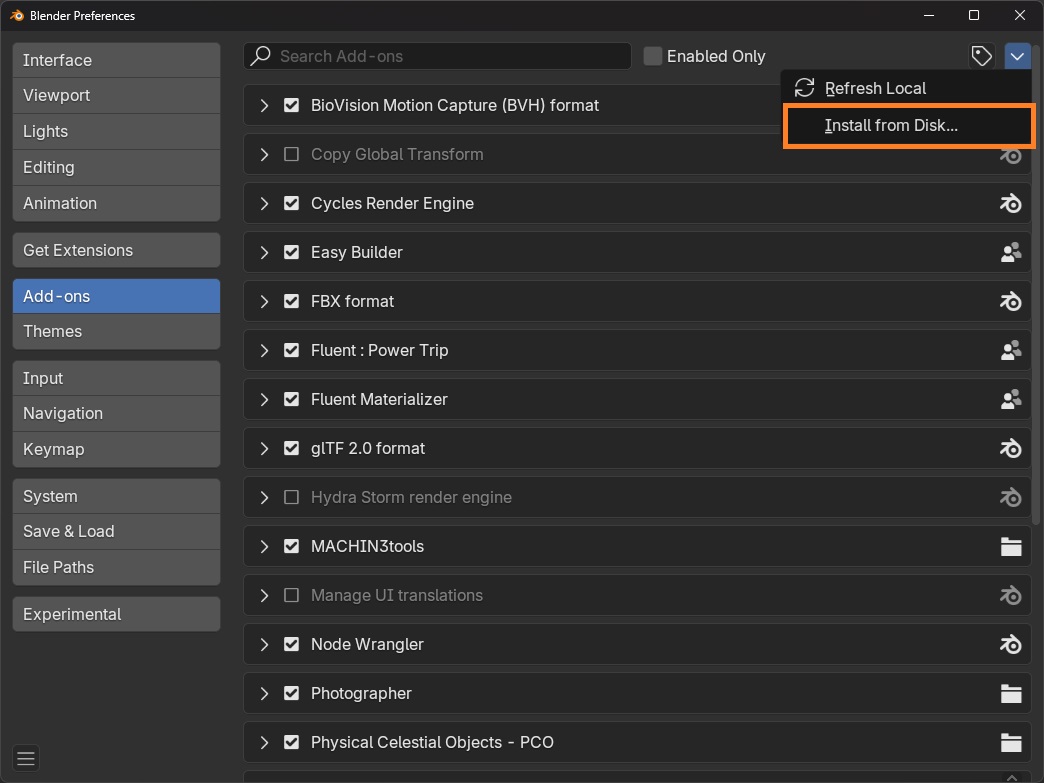
The second way to install is to go in the preferences, add-ons tab, click on the arrow in the top right corner, "Install from disk" and select the addon Zip file named addon_easy_builder_x.x.x.zip (where x.x.x is the latest version of the addon).

Info
You can change where the asset packs are installed, in the addon preferences -> "Path of installed libraries".
After the addon is installed, click on the import button  .
In the popup, select the Zip file named modular_scifi_x.x.x.zip (where x.x.x is the latest version of the addon).
Repeat the operation for the medieval house asset pack.
.
In the popup, select the Zip file named modular_scifi_x.x.x.zip (where x.x.x is the latest version of the addon).
Repeat the operation for the medieval house asset pack.
Info
If the asset packs are not showing, click on the refresh button  at the top of the preferences.
Warning
After any change, save the preferences and restart Blender to prevent any issues.